
Table of Contents
ToggleYour desktop doesn’t have to look like everyone else’s. And if you’ve spent hundreds of hours building, mining, and exploring in Minecraft, why not bring some of that blocky charm to your screen? A cool Minecraft wallpaper does more than fill empty space, it’s a daily reminder of the creativity, adventure, and endless possibilities that drew you into the game in the first place.
Whether you’re into sweeping landscapes of cherry blossom groves, menacing Wither battles frozen mid-explosion, or minimalist Creeper silhouettes, there’s a Minecraft wallpaper that speaks to your playstyle. In 2026, the variety is staggering. Ray-traced renders rival AAA game cinematics, pixel art callbacks honor the game’s roots, and community artists keep pushing what’s possible with a game built on cubes.
This guide breaks down the best types of wallpaper minecraft designs, where to find them, how to make your own, and what’s trending right now. Let’s dig in.
Key Takeaways
- A cool Minecraft wallpaper brings your gameplay experience to your desktop and serves as a daily reminder of the game’s creativity and endless possibilities.
- Minecraft wallpapers come in diverse styles—from scenic landscapes and pixel art to realistic ray-traced renders—allowing you to match your desktop to your playstyle and aesthetic preferences.
- You can find high-quality Minecraft wallpapers on platforms like Wallpaper Engine, Wallhaven, DeviantArt, and community sites like r/MinecraftWallpapers and Planet Minecraft.
- Creating custom Minecraft wallpapers is accessible through in-game screenshots with shaders, rendering software like Chunky or Blender, and post-processing tools like GIMP or Photoshop.
- Match your wallpaper resolution to your device—1920×1080 for standard monitors, 1440×2560 for mobile, and ultra-wide formats for multi-monitor setups to avoid image distortion.
- Trending Minecraft wallpaper styles in 2026 include Cherry Grove biome scenes, Deep Dark horror aesthetics, retro pixel art nostalgia, and animated interactive wallpapers powered by Wallpaper Engine.
Why Minecraft Wallpapers Never Go Out of Style
Minecraft hit its stride back in 2011, and here we are in 2026, still hunting for the perfect wallpaper. That longevity isn’t an accident.
The game’s visual identity is timeless in a way few other titles manage. Realistic graphics age. Trends shift. But chunky blocks, bold colors, and that signature pixelated aesthetic? They’re immune to obsolescence. A Minecraft wallpaper from 2013 can sit comfortably next to one rendered with path-tracing in 2026, and both feel at home.
Plus, Minecraft wallpapers carry emotional weight. That sunset over a mountain range might remind you of your first survival world. A Nether fortress could recall the first time you took on a Blaze and lived to tell the tale. These aren’t just pretty pictures, they’re snapshots of moments you lived through, even if they happened inside a sandbox.
And the community keeps feeding the fire. Talented artists, shader developers, and rendering enthusiasts upload fresh designs daily. Official updates like Caves & Cliffs and The Wild Update introduced new biomes, mobs, and structures, each spawning waves of fresh wallpaper content. As long as Minecraft keeps evolving, so will its visual fan art.
Types of Cool Minecraft Wallpapers for Every Player
Not all Minecraft wallpapers are created equal. Your taste depends on how you play, what you value, and how cluttered (or clean) you like your desktop. Here’s the breakdown.
Scenic Landscape and Biome Wallpapers
These are the crowd-pleasers. Think sweeping vistas: a cherry blossom grove at dawn, a frozen tundra under the aurora, or a mesa plateau bathed in golden-hour light. Landscape wallpapers showcase Minecraft’s procedural beauty without focusing on any one character or structure.
They’re perfect if you want something calming and immersive. Pair them with shaders like BSL or Complementary Reimagined, and you’ve got desktop art that rivals any nature photograph.
Popular biomes for wallpapers include:
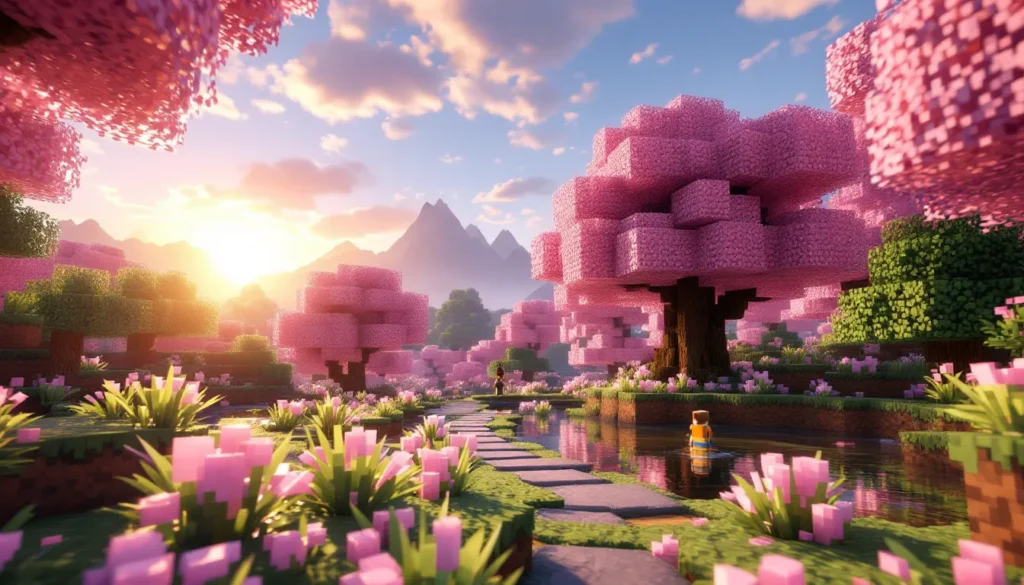
- Cherry Grove (added in 1.20) for pastel pink serenity
- Deep Dark for moody, atmospheric dread
- Mangrove Swamp for lush, tangled greenery
- Warped Forest in the Nether for alien, teal-hued landscapes
Character and Mob-Focused Designs
Maybe you’re a Creeper fan. Or you love the blank, inscrutable stare of Steve. Character-focused wallpapers zoom in on Minecraft’s iconic mobs and player skins, often in dramatic or humorous poses.
These designs work best when they tell a micro-story: an Enderman holding a grass block in the rain, a Warden emerging from the darkness, or Alex standing triumphant atop a defeated Ender Dragon. They’re bold, instantly recognizable, and work great on mobile wallpapers where detail matters less than silhouette.
Pixel Art and Retro-Style Wallpapers
Minecraft is a love letter to the 8-bit and 16-bit eras, and pixel art wallpapers lean into that nostalgia hard. These designs strip away shaders, lighting effects, and realism, embracing the raw blockiness that made Minecraft what it is.
Retro-style wallpapers often feature:
- Chunky, low-resolution textures
- Flat lighting and bold outlines
- Callbacks to classic gaming artwork
- Simple color palettes with high contrast
If you grew up on NES or SNES and want your desktop to reflect that, this is your lane.
Realistic and Ray-Traced Minecraft Wallpapers
On the opposite end of the spectrum, realistic wallpapers use path-tracing, advanced shaders, and high-resolution texture packs to make Minecraft look photorealistic. Thanks to NVIDIA’s RTX support and community projects like SEUS PTGI and Continuum RT, Minecraft can look like a AAA Unreal Engine game if you know where to look.
These wallpapers are stunning but resource-intensive to create. They often feature:
- Realistic water reflections and caustics
- Volumetric lighting and god rays
- PBR (physically-based rendering) textures
- Extreme depth of field and motion blur
If you want to blow people’s minds when they see your desktop, go realistic.
Minimalist and Abstract Minecraft Art
Not everyone wants visual noise. Minimalist Minecraft wallpapers distill the game down to its essence: a single Creeper face on a black background, a geometric block pattern, or a stylized logo.
These designs are clean, professional, and won’t distract you when you’re trying to focus. They’re also easier to match with desktop themes and icon packs.
Top 50+ Cool Minecraft Wallpapers to Download Now
Here’s where we get specific. These categories represent some of the most visually striking and popular cool minecraft wallpapers you can grab right now.
Epic Building and Structure Wallpapers
Minecraft’s building community is legendary, and many of the best wallpapers feature jaw-dropping player-made structures. Medieval castles, futuristic cities, floating islands, and sprawling cathedrals all make for incredible desktop backgrounds.
Look for wallpapers that:
- Showcase large-scale builds with intricate detail
- Use shaders to enhance lighting and shadows
- Feature unique architectural styles (steampunk, gothic, modern, etc.)
- Include environmental storytelling (villages, pathways, gardens)
Some of the best building wallpapers come from servers like Hypixel or build teams like BlockWorks, which release promotional renders of their projects.
Nether and End Dimension Designs
The Nether and End dimensions offer visual variety that the Overworld can’t match. Crimson forests, basalt deltas, and End cities provide alien, otherworldly backdrops perfect for darker, moodier wallpapers.
Top picks include:
- Nether fortresses silhouetted against lava seas
- Bastion remnants with gold block accents
- End ships floating in the void
- Ender Dragon battle scenes with End crystals glowing
These wallpapers work especially well if you’re into darker themes or want something visually distinct from the usual grassy plains.
Caves and Cliffs Update Wallpapers
The Caves & Cliffs Update (1.17 and 1.18) overhauled Minecraft’s underground and terrain generation, introducing lush caves, dripstone caverns, and towering mountain peaks. Wallpapers featuring these new biomes exploded in popularity and remain some of the most downloaded designs in 2026.
Key features:
- Lush caves with glow berries and axolotls
- Dripstone caves with dramatic stalactites and stalagmites
- Snowy peaks and jagged mountain ranges
- Deep dark biomes with sculk sensors and Wardens
These wallpapers benefit massively from shaders, which bring out the depth and atmosphere of the new cave systems.
PvP and Combat Action Shots
For competitive players, nothing beats a high-energy combat wallpaper. These designs capture the chaos of PvP servers, Bedwars matches, or solo boss fights.
Common elements:
- Players mid-swing with enchanted swords glowing
- TNT explosions and particle effects
- Team battles on floating islands or arenas
- Boss mobs like the Wither or Ender Dragon in attack poses
If you spend most of your time on servers like Hypixel or Mineplex, these wallpapers hit different. They remind you why you boot up the game every day.
Where to Find High-Quality Minecraft Wallpapers
Hunting for the perfect wallpaper can feel like mining for diamonds, lots of cobblestone before you strike gold. Here’s where to dig.
Best Free Wallpaper Websites and Resources
Several dedicated wallpaper sites host massive Minecraft collections, often sorted by resolution, theme, and popularity.
Top picks:
- Wallpaper Engine (Steam): A paid app ($4 on Steam) with thousands of animated and static Minecraft wallpapers. Many feature dynamic weather, moving clouds, or interactive elements. Worth every penny if you want your desktop to feel alive.
- Wallhaven: Free, no ads, community-curated. Search “Minecraft” and filter by resolution. Quality is high, and you can sort by favorites or views.
- Unsplash and Pexels: Known for photography, but both have started hosting digital art, including Minecraft renders. Hit-or-miss, but when you find something good, it’s usually high-res and unique.
- DeviantArt: A treasure trove of fan art. Use the search filters to find wallpaper-sized images. Some artists offer download links: others require a DM or commission.
Many of these platforms feature content from players who use advanced mods to enhance their screenshots.
Community Art Sites and Reddit Communities
The Minecraft community is prolific, and several subreddits and forums are goldmines for fresh wallpapers.
Best communities:
- r/Minecraft: The main subreddit often has “screenshot Saturdays” where players post their best in-game shots. Many are wallpaper-worthy.
- r/MinecraftWallpapers: A smaller, dedicated sub for sharing and requesting wallpapers. Active enough to see new posts weekly.
- Planet Minecraft: Long-running fansite with a “Wallpapers” section. User-uploaded, often tied to specific builds or texture packs.
- Discord servers: Shader developers and build teams often share exclusive renders in their Discord servers. Join servers for shaders like BSL, Complementary, or build teams like BlockWorks for behind-the-scenes content.
Official Minecraft Assets and Promotional Art
Mojang and Microsoft release promotional artwork for every major update, and much of it is wallpaper-ready.
Where to find official art:
- Minecraft.net: The official site’s news section often includes high-res artwork for updates, events, and anniversaries. Right-click, save, and you’re set.
- Minecraft Launcher backgrounds: The launcher cycles through gorgeous artwork tied to seasonal events and updates. You can find these images in your Minecraft installation folder (
.minecraft/assets). - Minecraft’s social media: Twitter, Instagram, and YouTube channels regularly post promotional renders. These are polished, professional, and usually available in high resolution.
Official art has a level of polish that fan-made content sometimes can’t match, especially for key art featuring mobs and characters.
How to Create Your Own Custom Minecraft Wallpaper
Why settle for someone else’s vision when you can create your own? Making a custom Minecraft wallpaper isn’t as hard as it sounds, and the results can be deeply personal.
Using In-Game Screenshots and Shaders
The simplest method: take a screenshot in-game and use it as your wallpaper. But to make it look good, you’ll need shaders.
Steps:
- Install a shader pack. Popular options in 2026 include BSL Shaders, Complementary Reimagined, SEUS PTGI, and MakeUp Ultra Fast. Most require Optifine or Iris (for Fabric).
- Find your shot. Explore until you find a scene worth capturing. Sunrises, sunsets, and stormy weather add drama. Use F1 to hide the HUD.
- Adjust shader settings. Tweak bloom, depth of field, and color grading for the mood you want.
- Take the screenshot. Press F2 (Java Edition) or your platform’s screenshot key. Screenshots save to
.minecraft/screenshots. - Crop and resize. Use an image editor to match your monitor’s resolution (1920×1080, 2560×1440, 3840×2160, etc.).
For even better results, use a resource pack with higher-resolution textures, like Faithful 64x or Mizuno’s 16 Craft. Players who enjoy customizing their experience often find this process rewarding.
Minecraft Rendering Software and Tools
If you want cinematic quality, you’ll need dedicated rendering software. These tools import Minecraft worlds and render them with ray-tracing, advanced lighting, and camera controls.
Top rendering tools:
- Chunky: Free, open-source, and powerful. Imports Minecraft worlds and renders them with path-tracing. Steep learning curve, but results rival professional CGI.
- Mineways: Exports Minecraft worlds to 3D modeling software like Blender. Once in Blender, you have full control over lighting, materials, and camera angles.
- Blender (with Minecraft import plugins): The gold standard for 3D rendering. Plugins like MCprep streamline the process of importing Minecraft worlds and adding realistic materials.
- Cinema 4D / Maya: Professional tools used by YouTubers and animators. Overkill for most users, but if you’re serious about content creation, they’re worth learning.
According to tutorials on How-To Geek, rendering a single high-quality frame can take anywhere from 10 minutes to several hours depending on your hardware and settings.
Editing Tips for Professional-Looking Results
Raw renders often need post-processing to look their best. Here’s how to polish your wallpaper.
Editing checklist:
- Contrast and brightness: Boost contrast slightly to make details pop. Avoid crushing blacks or blowing out highlights.
- Color grading: Add a subtle color grade (warm for sunsets, cool for night scenes) to create mood.
- Sharpening: Apply a light sharpen filter to enhance block edges, but don’t overdo it.
- Vignette: A subtle vignette draws the eye to the center of the image.
- Text and logos: If you’re creating wallpapers for a YouTube channel or server, add branding in a corner. Keep it minimal, wallpapers should showcase the game, not your logo.
Tools like Photoshop, GIMP (free), or Lightroom make these edits easy. Even basic tools like Photopea (browser-based, free) can handle most tasks.
Optimizing Wallpapers for Different Devices and Resolutions
A wallpaper that looks perfect on your desktop might look terrible on your phone. Resolution and aspect ratio matter.
Desktop and Dual Monitor Setups
For single monitors, match your wallpaper resolution to your display. Common resolutions:
- 1920×1080 (1080p): Still the most common in 2026, especially on budget and mid-range monitors.
- 2560×1440 (1440p): The sweet spot for gaming monitors. Offers more screen real estate without the performance hit of 4K.
- 3840×2160 (4K): Increasingly common on high-end displays. Wallpapers need to be native 4K to avoid blurriness.
For dual monitor setups, you’ll need ultra-wide wallpapers (often 3840×1080 or 5120×1440). Some wallpaper sites let you filter by dual-monitor resolutions. Alternatively, use a panoramic Minecraft render and split it across both screens.
Pro tip: Tools like DisplayFusion or Wallpaper Engine let you span a single image across multiple monitors or set different wallpapers per screen.
Mobile and Tablet Wallpapers
Mobile screens are vertical, so landscape wallpapers need cropping or resizing. Most phones use 1080×1920 or 1440×2560 resolutions.
Tips for mobile:
- Focus on the subject: Crop wallpapers so the main subject (a character, mob, or structure) is centered.
- Avoid busy backgrounds: Mobile home screens are cluttered with icons. Simple, minimalist wallpapers work best.
- Use portrait-oriented renders: If you’re creating your own, render in portrait mode from the start.
Community sites often have mobile-specific categories. For players interested in engineering creative builds, mobile wallpapers featuring redstone contraptions or elaborate mechanisms are surprisingly popular.
Trending Minecraft Wallpaper Styles in 2026
Every year brings new visual trends, and 2026 is no exception. Here’s what’s hot right now.
1. Cherry Blossom Everything
The Cherry Grove biome (introduced in 1.20) remains wildly popular for wallpapers. Pink petals, soft lighting, and serene vibes make it perfect for spring-themed desktops. Expect to see this trend continue well into 2027.
2. Deep Dark Dread
On the opposite end, the Deep Dark biome and the Warden continue to dominate darker, horror-themed wallpapers. The sculk aesthetic, bioluminescent blues and blacks, creates a unique, eerie look that stands out. As discussed on Twinfinite, horror-themed Minecraft content has surged in popularity since the Warden’s introduction.
3. Nostalgia-Core
Retro wallpapers that evoke Minecraft’s beta and alpha days are making a comeback. Think old textures, simple lighting, and classic builds like dirt houses or cobblestone towers. It’s a callback to simpler times, and players who’ve been around since 2010-2012 are eating it up.
4. Animated and Interactive Wallpapers
Thanks to Wallpaper Engine, animated wallpapers are the new standard for desktop customization. Popular effects include:
- Day/night cycles
- Falling rain or snow
- Flowing water and lava
- Fireflies and glowing particles
These wallpapers are resource-light and add a layer of immersion static images can’t match.
5. AI-Generated Minecraft Art
AI art tools like Midjourney and Stable Diffusion have been trained on Minecraft imagery, and some artists are using them to create surreal, dreamlike Minecraft wallpapers. These designs blur the line between fan art and abstract expressionism. They’re divisive, some love the creativity, others find them uncanny, but they’re undeniably unique.
6. Ultra-Wide and Multi-Monitor Panoramas
As ultra-wide monitors (21:9 and 32:9) become more affordable, panoramic Minecraft wallpapers are trending. These designs often feature sprawling landscapes or cityscapes that take full advantage of the extra horizontal space. According to Rock Paper Shotgun, ultra-wide gaming setups have grown 40% year-over-year, driving demand for matching wallpapers.
Conclusion
Your desktop is prime real estate, and a cool Minecraft wallpaper is one of the easiest ways to make it feel like yours. Whether you’re drawn to the photorealistic glow of ray-traced sunsets, the nostalgic chunky pixels of retro art, or the alien beauty of the Nether, there’s a wallpaper out there that captures what Minecraft means to you.
In 2026, the options are better than ever. Community artists keep pushing boundaries, shader developers unlock new levels of visual fidelity, and official updates give us fresh biomes and mobs to immortalize. And if you can’t find what you’re looking for? Make it yourself. With shaders, rendering software, and a little creativity, your next wallpaper could be the one everyone else downloads.
So go ahead, transform your desktop. Your screen deserves better than the default wallpaper it came with.





